What is a PHP mode
A PHP mode defines how the web server processes PHP scripts for your website. The selected mode affects performance, CMS compatibility, .htaccess support, and the ability to configure PHP settings individually.
It is important to understand:
- PHP mode and PHP version are different settings
- first, the PHP processing mode is selected
- then the PHP version used by the website is specified
Available PHP modes
Apache module (mod_php)
Description
PHP is processed by the built-in Apache module.
User perspective
- stable and straightforward operation
- .htaccess support
- suitable for most CMS platforms
- good performance for typical websites
Limitations
- less flexibility in PHP configuration
- not the best option for high-load websites
CGI
Description
Each PHP request is processed by a separate CGI process.
User perspective
- process isolation
Limitations
- the slowest PHP mode
- not recommended for production websites
FastCGI (Apache)
Description
Apache passes PHP requests to a separate FastCGI process.
User perspective
- faster than CGI
- ability to select a PHP version per website
- .htaccess support
Limitations
- usually lower performance compared to PHP-FPM
FastCGI (Nginx + PHP-FPM)
Description
Nginx receives requests and forwards them to the PHP-FPM process manager.
User perspective
- maximum performance
- individual PHP settings per website
- modern and recommended mode
Important limitation
- .htaccess is not supported
LSAPI (OpenLiteSpeed)
Description
PHP is processed via the LSAPI module of the OpenLiteSpeed server.
User perspective
- high performance
- ability to choose the PHP version
- available only with OpenLiteSpeed
PHP mode comparison
| Mode | Performance | .htaccess | Individual PHP version |
|---|---|---|---|
| Apache module | high | yes | limited |
| CGI | low | yes | yes |
| FastCGI Apache | medium | yes | yes |
| FastCGI PHP-FPM | high | no | yes |
| LSAPI | high | depends | yes |
How to choose a PHP mode
Recommended scenarios:
- Standard website or CMS:
Apache module - High-traffic website:
FastCGI Nginx + PHP-FPM - .htaccess is required:
Apache module or FastCGI Apache - Server running OpenLiteSpeed:
LSAPI
How to choose a PHP version
The PHP version affects compatibility, performance, and website security.
Recommendations:
- use the latest stable PHP version for new websites
- check CMS and plugin requirements for older projects
- if errors occur after an update, try switching back to the previous version
Step-by-step guide to changing PHP mode and version
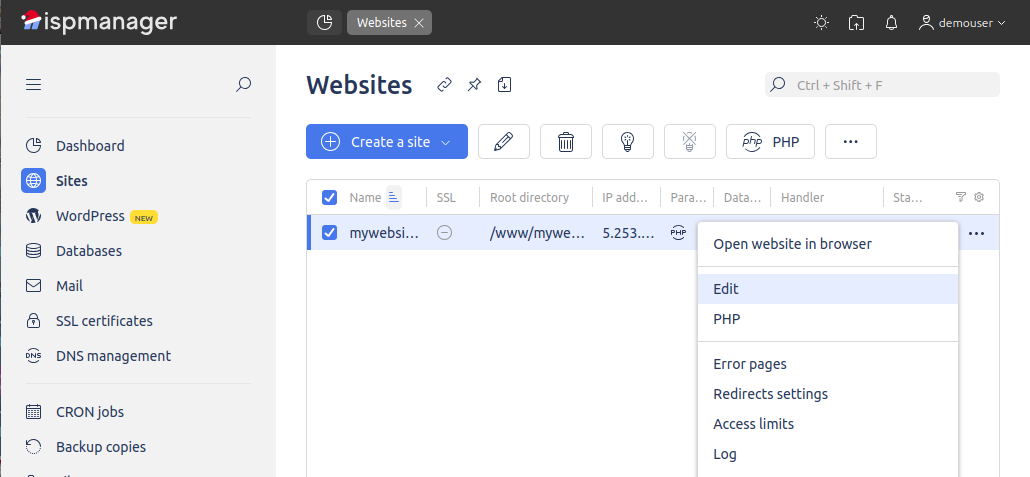
Step 1. Open website settings
Panel section: Websites
Select the required website and double-click it or click Edit.
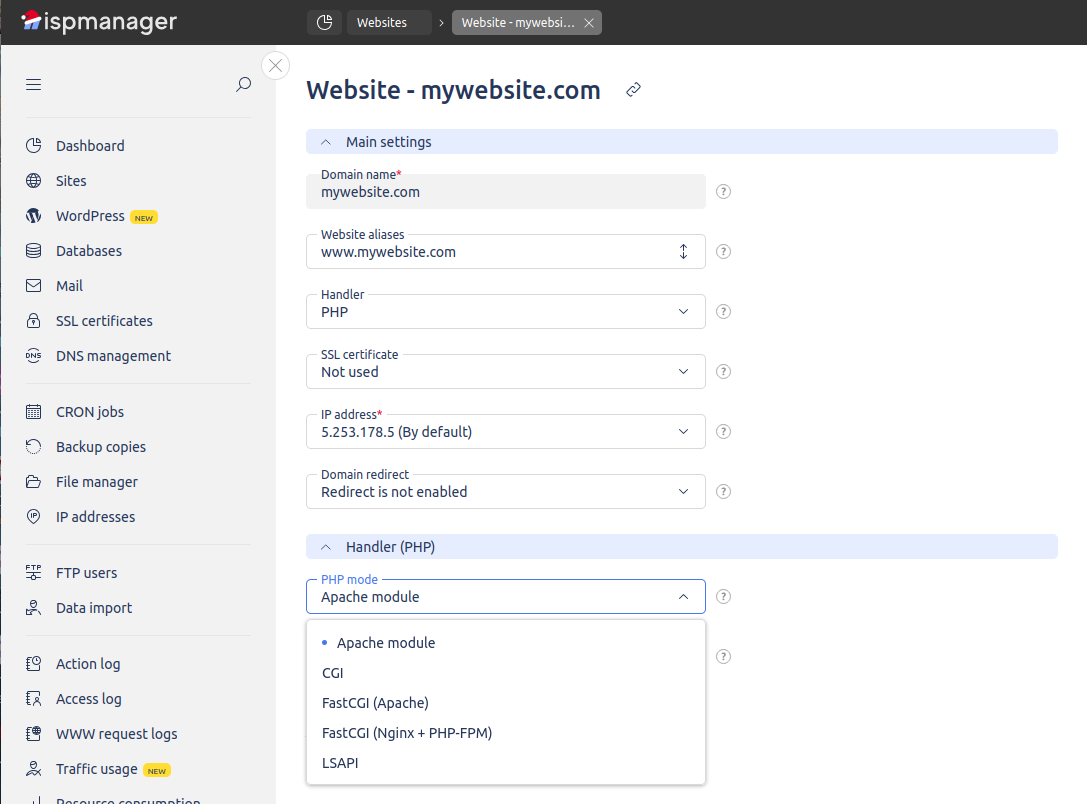
Step 2. Select PHP handler
In the PHP handler field, choose the required PHP processing mode.
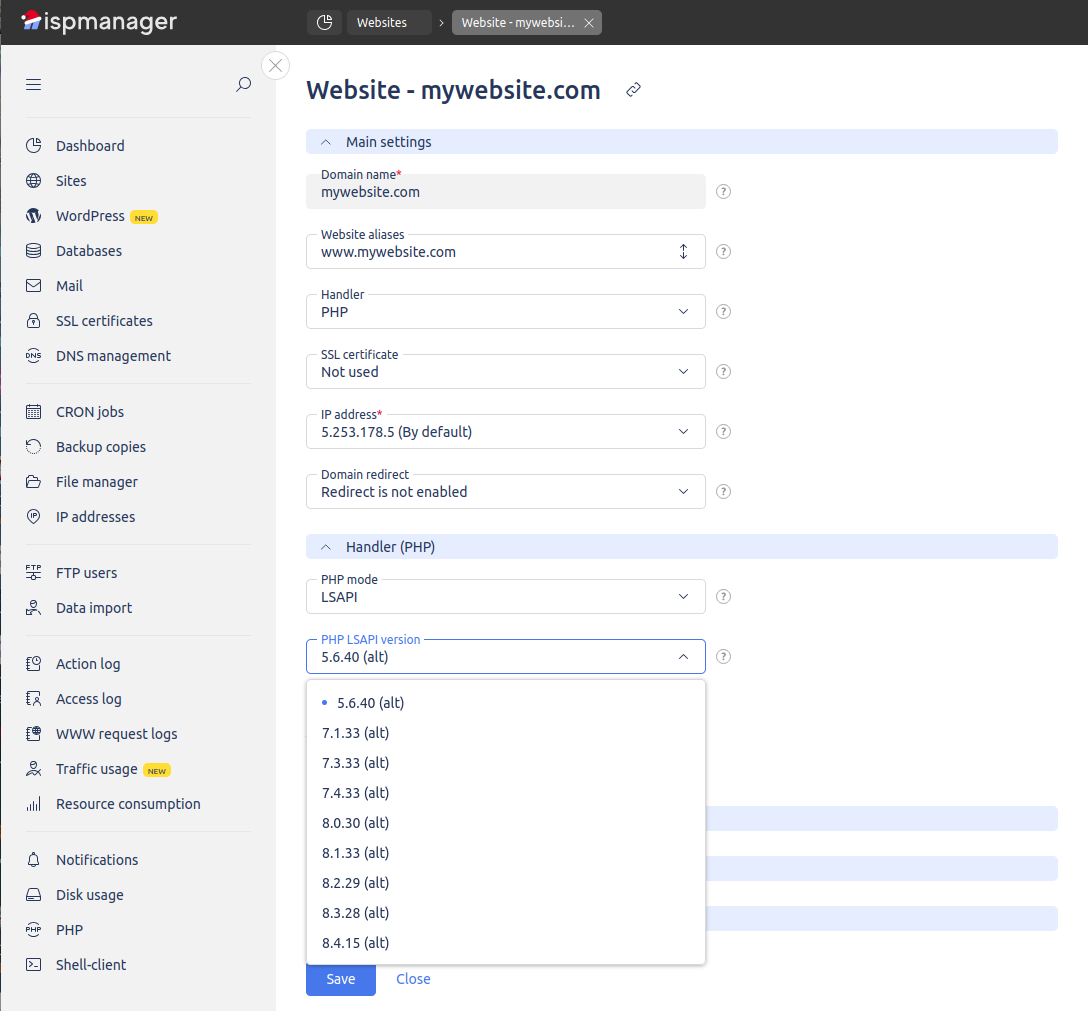
Step 3. Select PHP version
After selecting the mode, choose the required PHP version from the available list.
Step 4. Save changes
Click OK or Save and wait for the settings to be applied.
Common issues and solutions
Website does not load after changing PHP version
Revert to the previous version and check CMS compatibility.
.htaccess rules do not work
Make sure a PHP mode with .htaccess support is selected.
Low performance
It is recommended to switch to FastCGI PHP-FPM.
Conclusion
Choosing the correct PHP mode and PHP version directly affects website stability and performance. If you are unsure which settings to use, follow the recommended options or contact technical support.